Musology-related work has been a lil' bit on the back-burner over the past few months, as other things (like surgery!) have demanded my attention. But the past week or two I've been digging in again on the Phat Controller.
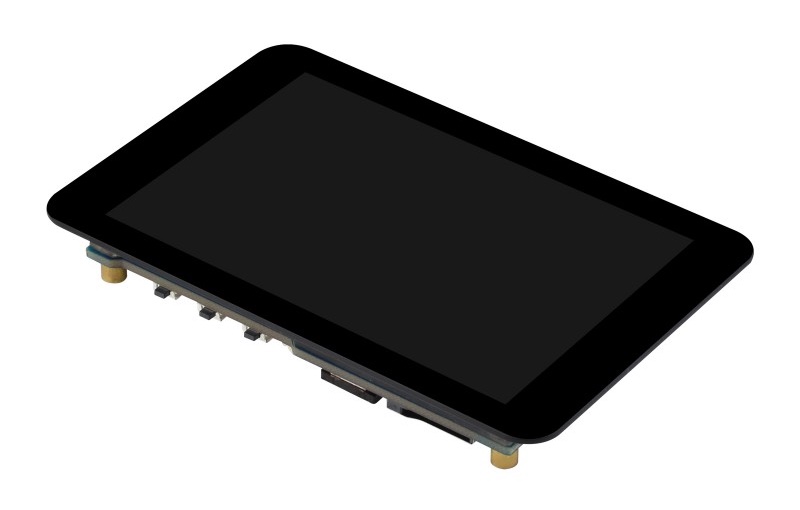
A lil' while back, I bought a Waveshare devkit that combines an ESP32 with a 3.5" touchscreen display.
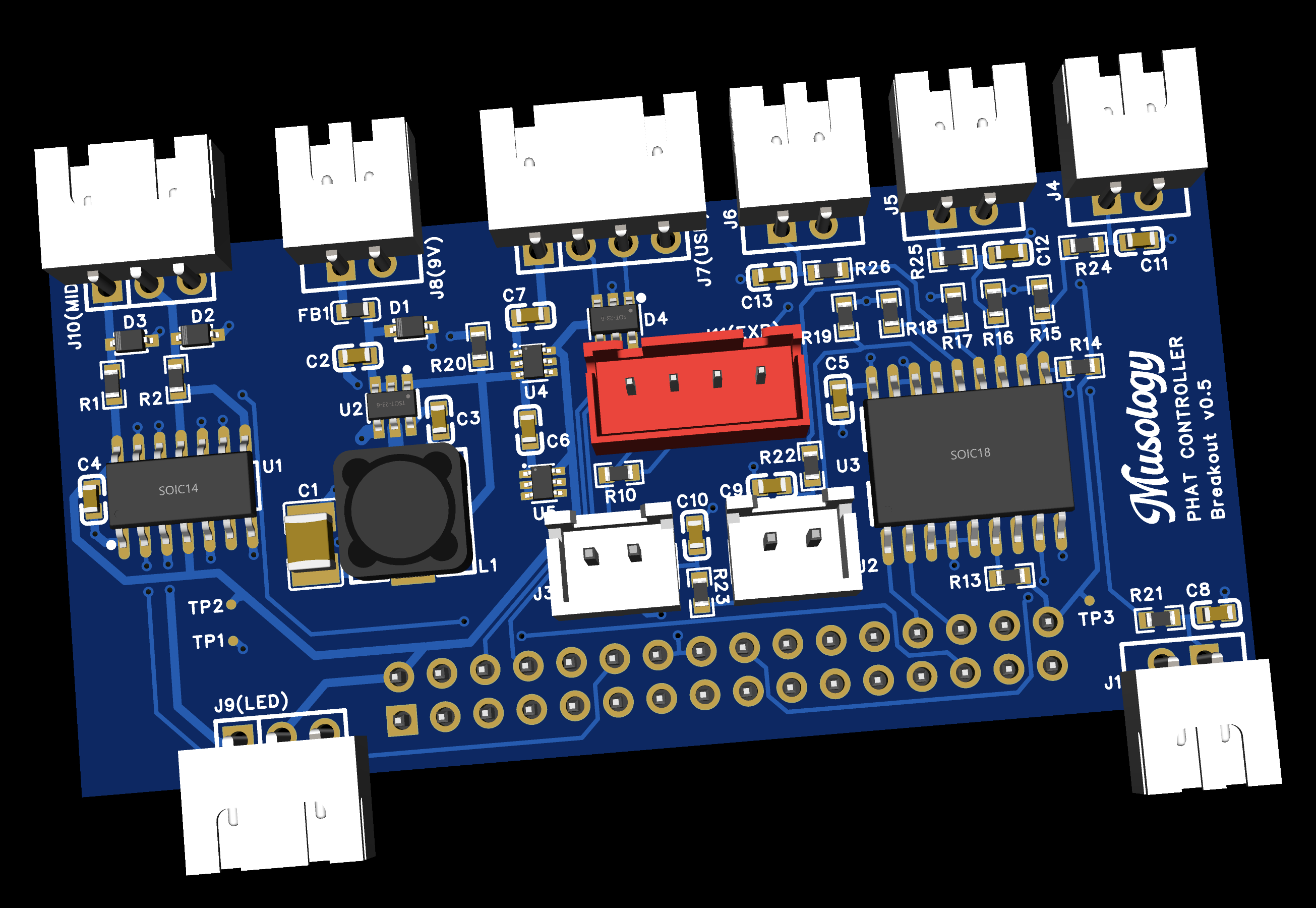
I've already designed a PCB that breaks out the Waveshare header pins for the switches, LEDs, TRS MIDI, expression, USB and power connectors. We've also got a preliminary CAD design for the enclosure in the works.
But until recently I hadn't had a chance to really do anything with the display itself. I've been putting some time into testing some UI design concepts, moving from sketches in Affinity to a "tapable prototype" working on the Waveshare unit.
As I'd hoped when buying it, it's proven to be a great prototyping tool that allows me to develop the firmware in parallel to the hardware.
The intent of the on-device screen is to provide "at a glance" indication of what each switch does. The general, high-level approach is to provide a tiled display, where each tile represents—is a proxy for—the function of one of the 6 footswitches + multicolour LEDs of the pedal. (The examples below hopefully illustrate this concept better than my words! 😏)
The desktop software allows the LED colour to be modified per slot per preset, and even within a specific slot when there is a "sequence" of notes assigned to a single switch. So for folx that can perceive the colour variations, it's another "glanceable" factor to help on-stage cognition of the switches' function. But most of the complexity of configuration is offloaded to the desktop app.
I know this is not a preferred model for a bunch of folx—it's a common criticism I see of the Source Audio range of products, that rely on the Neuro app to configure pedals like the C4 Synth, for example. But it's a design philosophy that underpins the Musology offering—to really focus on performance tools, not providing everything on a device with limited screen real-estate and input capacity.
Iteration 1 (next image) began to take shape when the functionality I was aiming to support was much smaller in scope than where we're at now—just MIDI notes being sent from the device. Thus, my initial concept emphasised the note that was being sent by the switch. As I added features to my "wishlist" for the device, the bottom section was added to outline the more complex details behind each switch press.
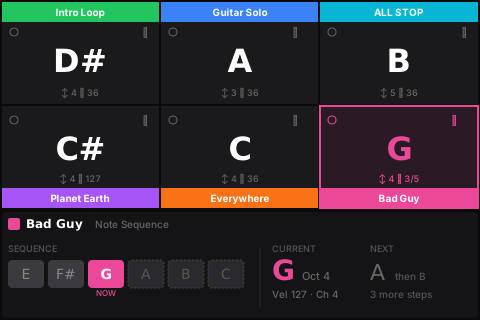
But upon review, I determined a few things that needed further consideration...
First, I realised that doesn't answer the question you have on stage—which is less about the MIDI note, and more about what that note will actually do. As my friend would say, the empharsis is on the wrong syllarble...
Second, the more complex details could easily be disrupted—if you tap one sequence pedal, then another momentary pedal, you'd lose the sequence details.
Third, as we were working on prototypes of the hardware and firmware, I realised we needed some visual indication that things were "working," without physical on-device controls (like additional transmit/receive LEDs added to the enclosure). Things like, did the device know something was connected? Was it detecting a switch press correctly? Was a MIDI note being sent? etc.
Fourth, for simpler functions, the bottom section was completely redundant. Here's some of my initial notes, reflecting on the design as we dug into it more and started expanding it out (iteration 2):
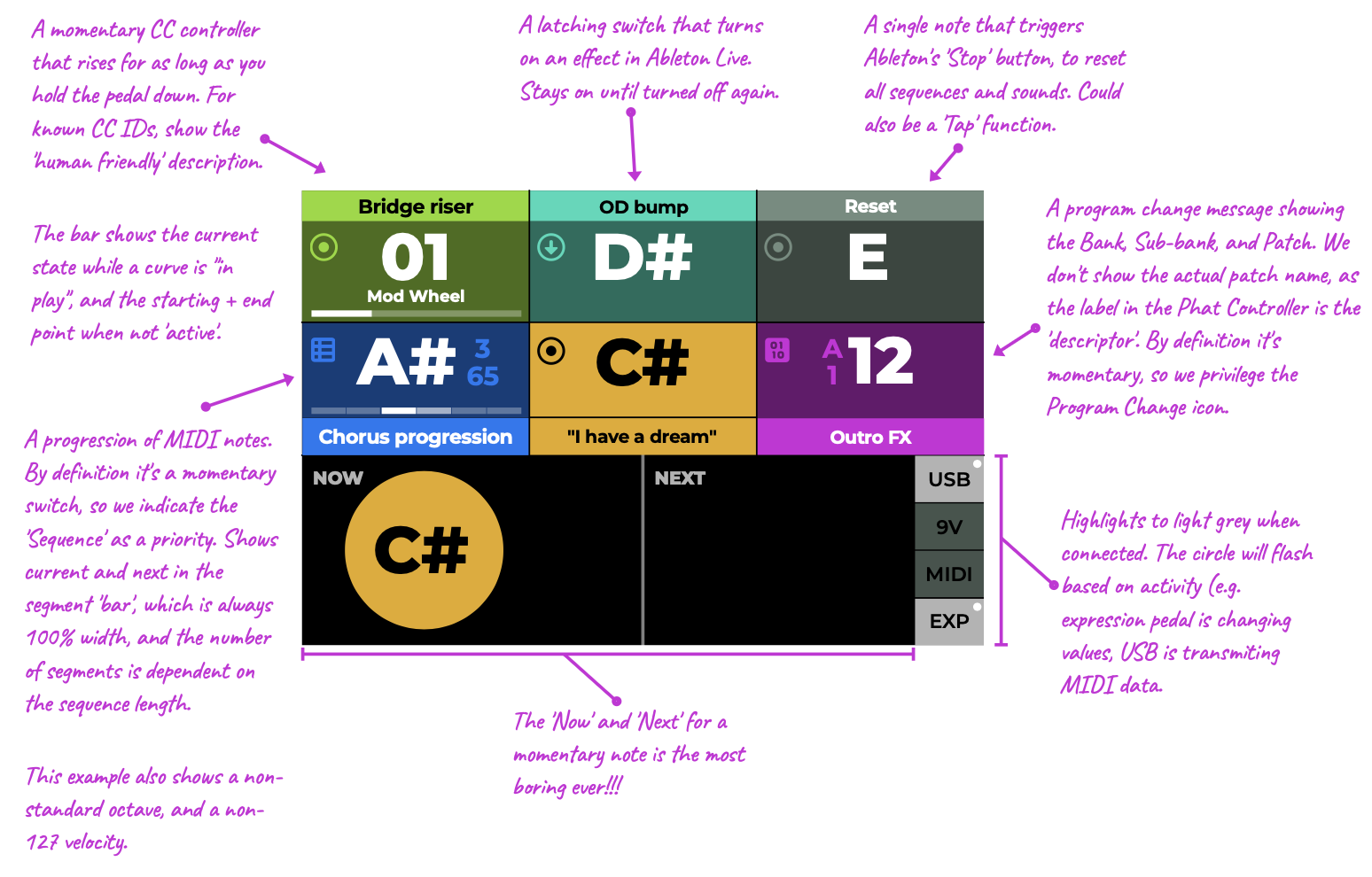
And last, but not least, when I mocked that up at physical scale—on the 3.5" device—much of the detail was too small to make sense of at a glance, from a distance of the mic-stand to the pedal board.
Thus, I embarked on a significant refactor to incorporate these learnings. The next iteration put the label front-and-centre, with the details of notes etc. as a secondary detail. The colour of the tile background matches the colour of the LED so that it's more apparent when one is "activated."
Considering all these factors, iteration 3 came out like this:
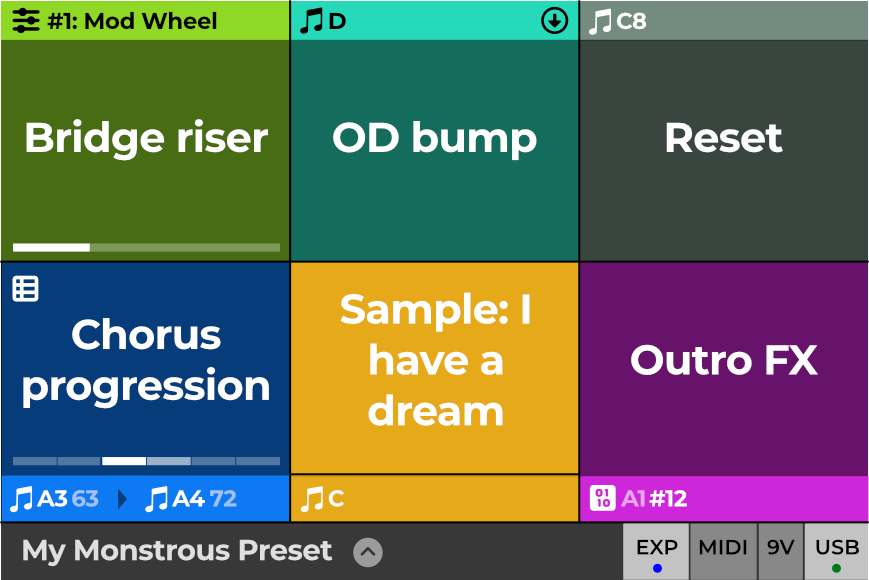
When I took another look at scale, it was far easier to make sense of what was going on. The detail is there, but in a more glanceable format, with the larger tile space—created by dropping the bottom panel—allowing us to represent the state within each tile. Where the extra detail is not needed, it is not shown, reducing the redundancy noted in the previous design.
Definitely a step forward, but still not quite there...
I've been doing user interface and interaction design for decades now, and I'm still fascinated by how translating a flat, static mockup into an interactive prototype changes things. There's a feel thing that only comes out when you're actually using it.
So I wanted to get this into a "clickable prototype" form as quickly as I could. I also wanted to test the low-cost, low-refresh, low-resolution display I had in mind with a low-memory micro-controller at the helm. (The panel is 60Hz refresh at 72 DPI, but the micro-controller can only really produce a 12–15Hz redraw.)
So I built a prototype firmware and flashed it to the Waveshare device. Immediately there were a bunch of issues with the static prototype that came to light. After a number of rapid iterations, I ended up with this (iteration 4):
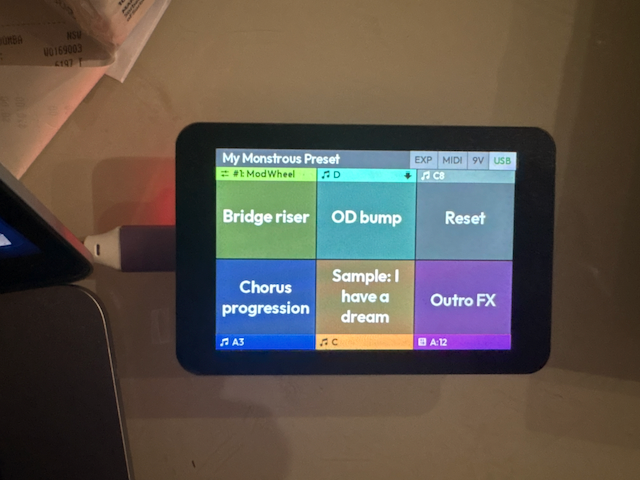
In real life, using this actually feels pretty good.
A key learning is that the animation/motion I'd put in place around the preset selection menu drawer (swipe down to open) and swipe to change preset (left- and right-swipe) leave a lot to be desired. The low refresh rate and memory constraints do not lend themselves well to the gesture-oriented features we are used to using on smartphones. So that will need some adjustment and re-thinking.
We're still trying to convey some of that other information in a small space, and frankly, I don't think we've struck the right balance, yet. It's still too busy, and I'm not convinced the extra information is actually helpful.
But I do think it's a big improvement—a demonstration of the power and importance of iterative design.
The concepts above are not based on any particular UI framework or design language. I wanted to create a distinct language for the Musology brand, so I started with something that was a "ground up" design. These ideas and prototypes are no doubt informed by my experience using popular design approaches, and my consideration of them from a UX/interaction design perspective in my professional practice. But they don't borrow directly nor lean-in heavily to one framework or another.
As I have been refining how we present details in a compact space, I wondered whether existing design languages like Google’s Material Design or Apple’s iOS 27 might offer some clues. The interaction and visual designers responsible for these visual languages and frameworks have a lot more resources and collective experience than I do, so it serves us well to consider such things, IMO.
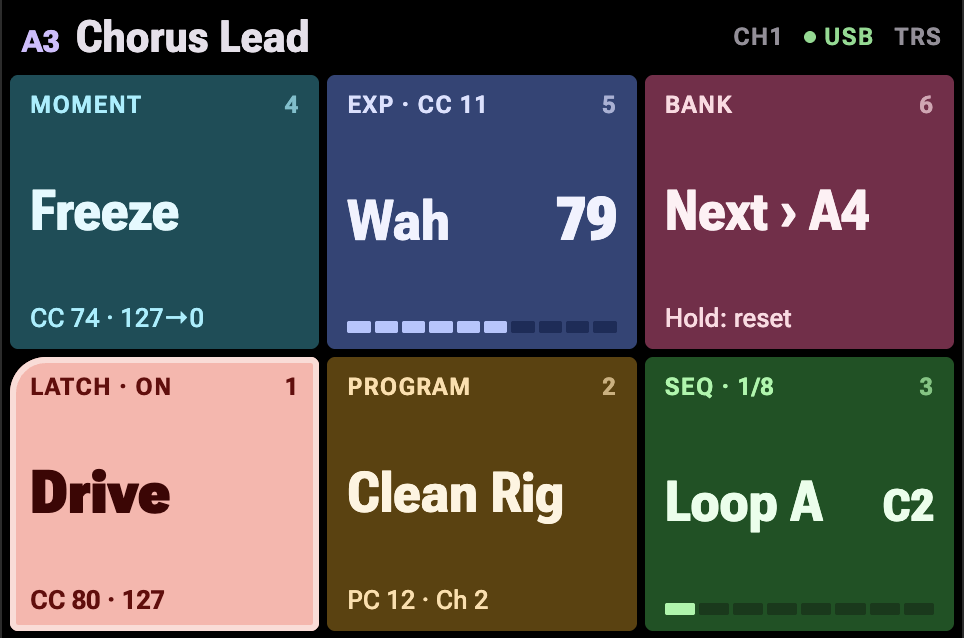
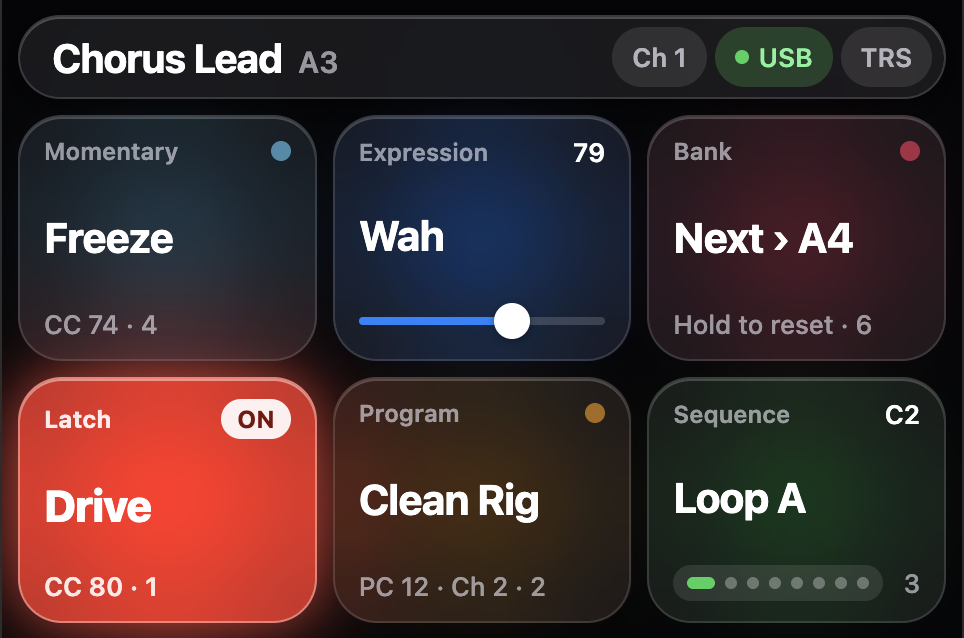
With this in mind, I employed Claude Design to ask how my basic sketches and ideas might translate into these different design systems. While far from perfect (which is totally fine for this exercise) it did produce some interesting "thought provocations."
For example, Material Design with a more compact orientation (think WearOS):
Or leaning into the iOS visual language:
Or a further narrowing in on using the "dynamic island"/notch approach to iOS and MacOS:
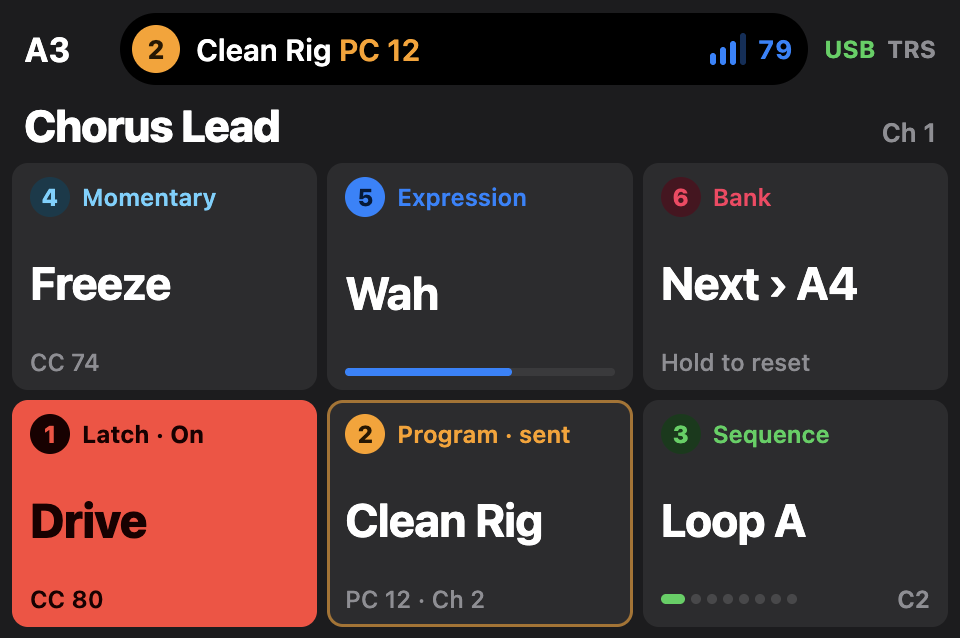
Claude misinterpreted my intent here (or I didn't explain it well enough). It just put a faux-notch in the design, not adapting the overall design to how developers are successfully employing and adapting the content of the island for their specific use-cases. But even with this seeming "mistake," there's some interesting ideas that we might adopt.
I'm an oldie in the industry, and I remember when the "Metro" design language was introduced by Microsoft for Windows Phone 7 and Windows 8 (around 2010–2012). There was a lot of backlash from the Windows user-base to this approach, resulting in some weird, half-baked "hedge our bets" in between that ended up becoming Windows 10.
I actually still quite admire and like what they did with the initial versions of Metro, and I was disappointed when Microsoft stepped back from it. In another timeline, I would have liked to have seen where that would have landed, avoiding the reactionary "roll back" they ended up doing.
So, for schnitz and giggles, I also asked for a variant in that direction:
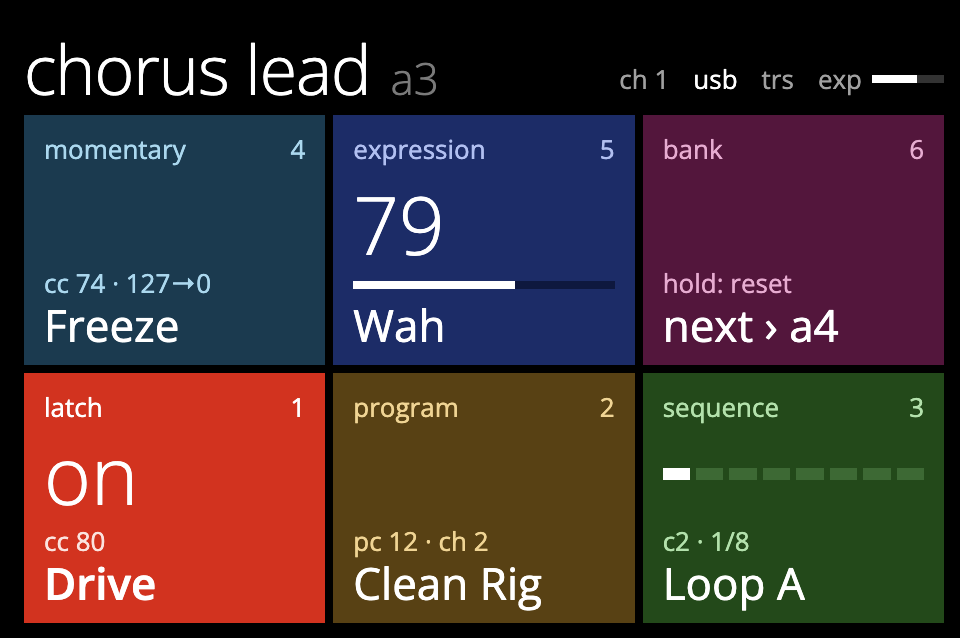
I must admit, I do dig this variant and direction. The Metro language leans on typography over icons, which I don't think necessarily works for this sort of compact display. But there's something about it that resonates with me. Perhaps I'm just showing my age...
I also asked for Claude's own take on the screen—i.e. without any context on other design systems or visual languages. Of course, it doesn't come up with things in a vacuum, so I asked it whether the design concept it produced was based on something else.
Claude claims it was influenced by: "guitar-gear screens, such as the per-switch name displays on Line 6 Helix units, where the text is coloured to match the switch LED. Also old studio-hardware labelling: a dark background, tight condensed type and fixed-width numbers." For reference, this is the result:
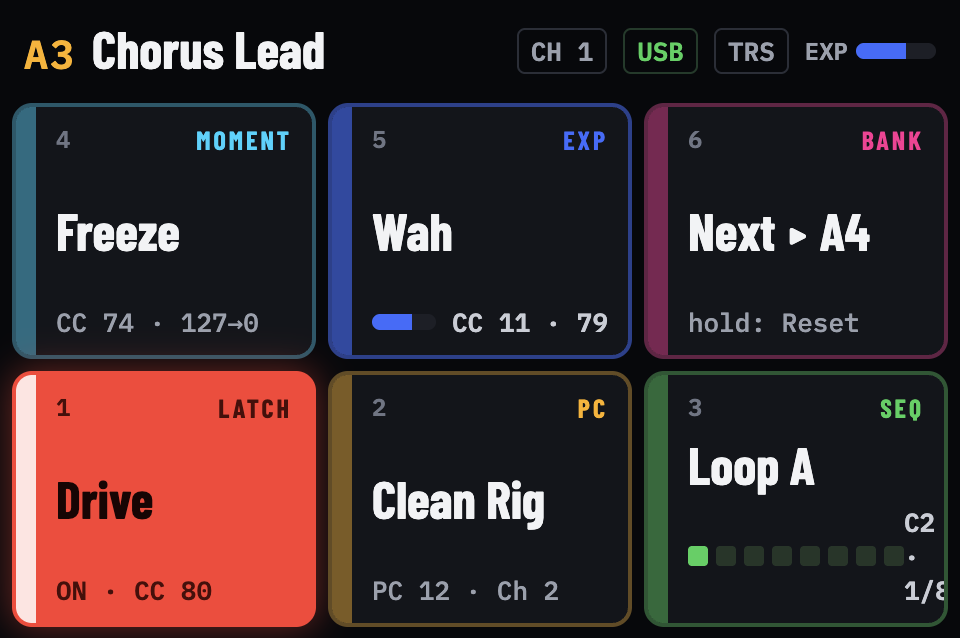
This is probably my least favourite. Which is perhaps not surprising—Musology is a bit of a reaction to the direction that gear has been going, and I find that much of what is being produced emphasises incredible engineering, but not necessarily great UX. There's a reason I haven't got a Helix or similar yet. And why I'm most interested in building products that "glue together" a more traditional pedalboard in smart ways.
But like all of the examples I've shared, there's elements that are worthy of consideration.
Now, I want to be clear on something: using Claude Design for this was intended to get a rapid view of some visual design directions. It is emphatically not a replacement for proper interaction, nor visual, design input or consideration.
Claude made so many mistakes in its interpretation and the UIs it produced are unusable for a bunch of reasons. Its translation is fairly mindless—there are elements in these mockups that make no sense what-so-ever on a practical/usability level. My experience is that these tools don't bring any innovative insights to the problem. Whether they will ever be able to do so is the subject of much debate, of course. But right now, they definitely just rehash existing ideas and well-trodden paradigms into a specific shape that helps me visualise and imagine what might be.
But it has been very useful for me to do something in about an hour that previously would have taken me a day.
It's now incumbent on me to take these rapid prototypes and mockups and do the actual thinking. To sift through the tidbits to work out how they might be applied to create something specifically useful.
This is a dichotomy with generative AI-based tooling that I wrestle with daily. Has this been helpful/useful? Yep. Has it prompted different thinking from me, and gotten me out of a rut? Yep. Do I have scruples about how these tools have been trained? Absolutely. How I balance these and reconcile them is tough.
I have many of these skills and thus can do the work myself. But this is a side-project where I have very limited time to work on things. So any acceleration I can get is appreciated. I have zero budget to employ a designer (which would absolutely be my preference), so no-one is "missing out" on work they otherwise would have gotten.
I'll also note that I asked Claude very specifically to emulate publicly available and specified frameworks, not an individual designer's work. Arguably, Claude's leaning on the Helix design—which I won't be going with, FTR—is an example where this is less clear-cut.
And, lastly, the input was an interaction design and mockups that I'd created from my own initial thinking and experience manually within Affinity and other software.
So, I think, on balance, this is an appropriate use of the tools. But, honestly, 🤷🏼♀️
There's still a lot of work to do. Not useless, but not a replacement for experience and thought and testing and all the other things that make up good design. That's my job, and my next steps reflect that.
One challenge I'm conscious of is to not create some weird "bitsa" hybrid monstrosity where I just mash-up different paradigms and models and approaches together. But I have found the experiments helpful in shaking up my ideas and considering other options in whatever the next version will be.
The "sequence" style slot is the hardest to convey. We have the fact it is a sequence, where we are in the sequence, what's next, and how many more we have to go, all in a very compact space. But this also needs to be constantly balanced with simpler options, to make sure that both work (based on our earlier learnings).
My experience of using this mode on prior—i.e. headless prototypes of the pedal I've used on stage—is that this extra contextual information is super-important. So I think my next steps will revolve around honing in on that display to resolve, and then step back out to consider the other use cases.
For example, the expression pedal–controlled CC display would be very similar in it's requirements. And the other use cases are actually simpler, so start with the hardest edge-cases, and work back from there.
But what do you think? Is there a standout here that you like best? What do you think would work best?
If you were to use a tool like this, what information do you envisage you'd need and want to pick up "at a glance" in the heat of a set?
Use the contact form to send me your thoughts...